I Replaced Every Lock in My House With Smart Locks — Here's My Honest Take After 8 Months
Eight months ago, I locked myself out of my own house for the third time in a year. Standing on my porch in the rain at 11 PM, waiting for a locksmith who charged me $150 to open my own front door, I made a decision: every lock in this house was getting replaced with a smart lock. No more keys. No more hiding spare keys under fake rocks. No more calling locksmiths. Here's what happened when I actually went through with it — the good, the bad, and the stuff nobody mentions in product reviews.
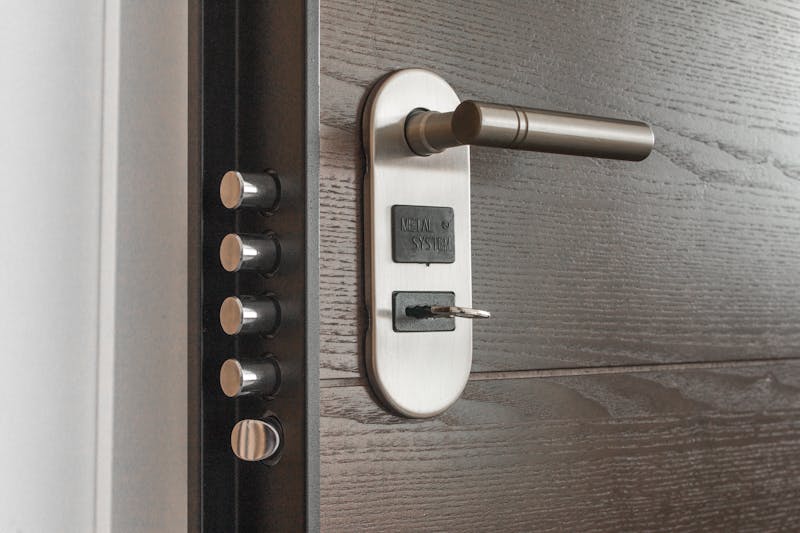
The Setup: 4 Doors, 4 Different Smart Locks
My house has four exterior doors: front door, back door, garage entry, and a side door to the basement. Instead of buying four of the same lock, I deliberately picked four different brands and models. Partly because I wanted to test them head-to-head. Partly because each door had different requirements.
Here's what I installed:
- Front door: Yale Assure Lock 2 with Wi-Fi module ($250)
- Back door: August Wi-Fi Smart Lock (4th Gen) ($230)
- Garage entry: Schlage Encode Plus ($300)
- Basement side door: Wyze Lock Bolt ($70)
Total cost: roughly $850 before tax. That's about six locksmith visits, for reference. Already felt like a bargain.
Installation: Easier Than Expected (Mostly)
I'm not particularly handy. I own a drill and a basic screwdriver set, and that's about the extent of my tool collection. So I was nervous about installing these myself.
Yale Assure Lock 2 — Front Door
The Yale was the most straightforward install. Took about 25 minutes. The instructions were clear, the mounting plate lined up perfectly with my existing deadbolt holes, and the Wi-Fi module snapped in without issues. The DoorSense sensor (a small magnet that tells the lock whether the door is actually closed) was a nice touch. No more wondering if I forgot to close the door.
August Wi-Fi Smart Lock — Back Door
August's approach is different: you keep your existing deadbolt and exterior hardware, and the August replaces only the interior thumbturn. This means the outside of my back door still looks completely normal — no one would know there's a smart lock there. Installation took about 15 minutes. The magnetic mounting plate was clever but felt a little wobbly at first. It settled after a week.
Schlage Encode Plus — Garage Entry
This one was the premium pick, and installing it showed why. It's a full deadbolt replacement with a built-in keypad, built-in Wi-Fi, and Apple Home Key support. The build quality is noticeably heavier than the others. Installation took about 35 minutes because I had to adjust the strike plate. The existing hole was slightly off from Schlage's template, so I had to do some light chiseling. Not hard, but not fun either.
Wyze Lock Bolt — Basement Door
At $70, I expected the Wyze to feel cheap. And the packaging was definitely budget — thin cardboard, minimal accessories. But the lock itself? Surprisingly solid. It's a fingerprint-only lock (no Wi-Fi, no keypad, just your fingerprint). Installation was simple, and registering my fingerprints took about two minutes. I added my wife's fingerprints too. The whole process from unboxing to working lock was under 20 minutes.
Month 1-2: The Honeymoon Phase
Everything worked perfectly. I was auto-unlocking my front door as I walked up the driveway (Yale's geofencing). I was unlocking the back door for my dog sitter with a temporary code. I was tapping my Apple Watch against the Schlage to open the garage entry. It felt like living in the future.
My wife, who was skeptical about the whole project ("What's wrong with regular keys?"), came around after about two weeks. The convenience of not carrying house keys was immediately noticeable. She started leaving her keychain in the car since all she needed was her phone.
Small wins that added up:
- No more "did I lock the door?" anxiety — I could check from my phone
- Temporary codes for the dog walker, house cleaner, and in-laws
- Auto-lock after 30 seconds — the door locked itself whether I remembered or not
- Activity logs showing exactly when each door was locked/unlocked and by whom
Month 3-5: Reality Sets In
This is where the honest review starts. Around month three, I started running into real-world issues.
Battery Life Varies Wildly
The Yale front door lock gets used 8-10 times per day (it's the main entrance). After three months, the battery indicator dropped to 40%. The August back door, used maybe 3-4 times daily, was still at 75%. The Schlage held up best — still showing 80% at the three-month mark, despite daily use. The Wyze doesn't have a battery indicator in an app (no Wi-Fi, remember), so it just died one day without warning at around month four. Swapping in new batteries took 30 seconds, but the surprise was annoying.
The Wi-Fi Problem
My back door is the farthest point from my router. The August lock lost Wi-Fi connection roughly once a week, which meant I couldn't control it remotely until it reconnected. I eventually added a Wi-Fi extender near the back door, which solved it. But that's an extra cost and setup step nobody mentions in reviews. If your home has thick walls or dead spots, plan for this.
Auto-Unlock Isn't Perfect
The Yale's geofencing auto-unlock worked maybe 80% of the time. The other 20%, I'd stand at my door for 10-15 seconds before pulling out my phone to unlock manually. This happens because GPS accuracy on phones varies, and sometimes the lock can't detect that you've arrived. It's faster than fumbling for keys, but it's not the magic experience the marketing suggests.
Guest Codes Need Management
I gave my mother-in-law a permanent code. She shared it with my father-in-law (fine). He somehow shared it with their neighbor who was "checking on the house" while we were on vacation. Suddenly someone I'd never met had access to my front door. Guest code management is important, and you need to treat codes like passwords — change them regularly and revoke them when they're no longer needed.
Month 6-8: The Settled-In Verdict
By month six, the novelty wore off and these locks just became... part of the house. Which is exactly what good smart home tech should do. You stop thinking about it. Here's my honest ranking after living with all four:
Winner: Schlage Encode Plus
It's the most expensive, but it's also the most reliable. Zero connectivity drops in eight months. The keypad is responsive and well-lit. Apple Home Key is genuinely magical — just tap your phone or watch and walk in. Battery life is the best of the bunch. Build quality feels like it'll last a decade. If you have the budget, this is the one.
Best Value: Wyze Lock Bolt
At $70, this lock has no business being this good. The fingerprint reader is fast and accurate — I'd say it works 95% of the time on the first try. No Wi-Fi means no app control or remote access, but for a secondary door that you personally use, it's perfectly fine. My only worry is long-term durability, but after eight months it's still going strong.
Best for Renters: August Wi-Fi Smart Lock
Because it only replaces the interior thumbturn, you can install it without modifying the deadbolt. When you move, just swap the original thumbturn back. Perfect for rental situations where you can't change the hardware. The Wi-Fi issues were annoying but solvable.
Solid All-Rounder: Yale Assure Lock 2
The Yale is a good lock at a good price. It does everything well without being the best at anything specific. The modular design (swap between Wi-Fi, Bluetooth, Zigbee, or Z-Wave modules) is a smart approach for future-proofing. If you're already invested in a smart home ecosystem, the Yale will probably fit right in.
What I'd Do Differently
If I started over today, I'd make two changes:
- Buy a smart home hub first. Most of these locks work better with a hub (like a HomePod or Echo) that keeps them connected. I added a HomePod Mini near the front door after month two and it improved the Yale's reliability significantly.
- Budget for batteries. Plan on replacing batteries every 4-6 months for frequently-used doors. I buy CR123A batteries in bulk from Amazon now. It's not expensive, but it's a recurring cost nobody mentions.
The Costs Nobody Talks About
Let's be real about total cost of ownership:
- Locks: $850 (one-time)
- Wi-Fi extender: $40 (one-time)
- HomePod Mini as hub: $100 (one-time)
- Replacement batteries: ~$30/year
- Smart lock batteries (annual estimate): ~$50/year for all four doors
First year total: ~$1,070. After that, roughly $80/year in batteries. Compare that to $150 per locksmith visit, and it pays for itself fast — assuming you're the type who loses keys. Which I definitely am.

Should You Switch to Smart Locks?
Honestly? Yes, but with realistic expectations. Smart locks won't turn your home into a fortress — they're fundamentally about convenience, not security upgrades. A determined intruder isn't picking your deadbolt either way. What smart locks give you is:
- Never getting locked out again
- Easy access management for family, guests, and service workers
- Peace of mind knowing your doors are locked (because you can check)
- A genuinely useful smart home foundation
If you're already building out your smart home setup with things like smart plugs for energy monitoring, adding smart locks is a natural next step. Start with your most-used door. If you love it (you will), expand from there.
And for the love of everything, stop hiding spare keys under fake rocks. Your neighbor's kid knows exactly where that rock is.


Comments
Post a Comment